Google Ads Management Services in Muzaffarpur, Bihar
Grow your business with DigitalUdaan’s Google Ads management services in Muzaffarpur, Bihar. We offer Search Ads, Display Ads, and YouTube Ads campaigns to help local businesses, schools, coaching institutes, hospitals, and real estate companies reach relevant audiences through targeted advertising, keyword research, conversion tracking, and campaign optimization.
What Is Google Ads Management Service?
Google Ads management is a service provided by digital marketing agencies, freelancers, and marketing professionals to help businesses plan, create, monitor, and optimize their advertising campaigns through Google Ads.
Many business owners hire Google Ads professionals because they may not have enough time, technical knowledge, or experience to manage campaigns themselves.
The main goal of Google Ads management is to reach relevant audiences, control advertising costs, track campaign performance, and achieve business objectives such as generating leads, increasing website traffic, or driving sales.
What Are Search Ads?
Search ads are paid advertisements that appear on search engine results pages (SERPs). On Google, these ads are created and managed through Google Ads and usually appear with a Sponsored label.
Search ads are based on user intent. People may search to learn something, buy a product, compare services, or find a business.
Google Responsive Search Ads allow advertisers to add multiple headlines and descriptions. Each headline can contain up to 30 characters, and each description can contain up to 90 characters.
When we search for something on Google, we may see sponsored advertisements alongside organic search results. These paid advertisements are commonly known as Search Ads. Their positions can vary depending on the search query and ad auction.
Apart from Google, other search engines, such as Bing, Yahoo, DuckDuckGo, and Brave Search, also offer search experiences where advertisements may appear.
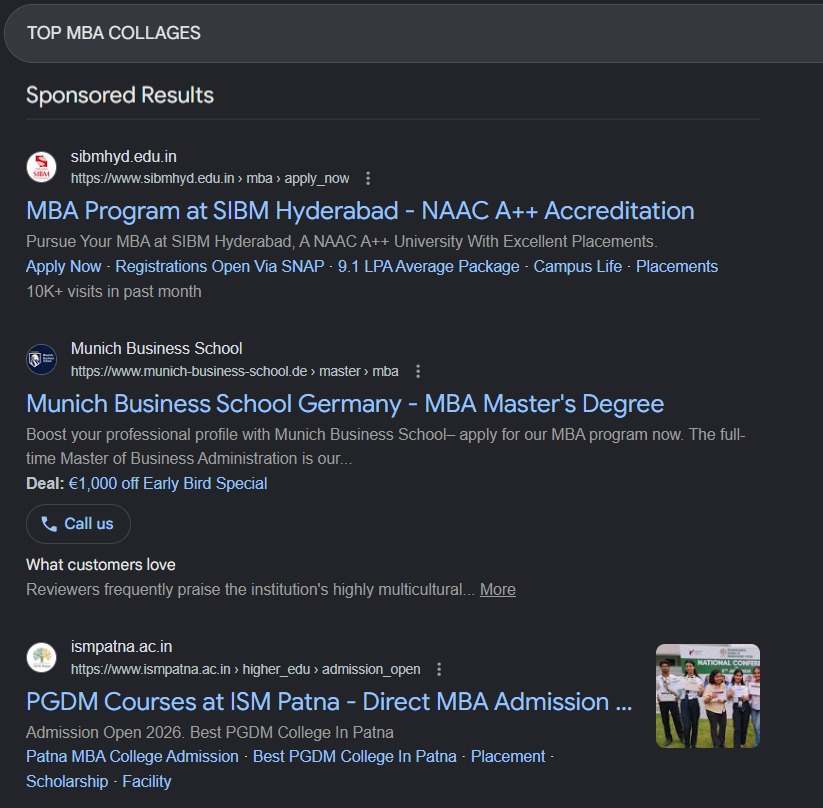
Search Ads Example
What Are Display Ads?
Display Ads are a type of online advertising that uses visual elements such as images, text, animations, and sometimes video to promote a product, service, or brand.
These advertisements can appear on third-party websites and mobile apps. They help businesses reach relevant audiences, increase brand awareness, and remind potential customers about their products or services.
Google Display Ads can appear on eligible websites and apps within the Google Display Network. Their placement depends on factors such as targeting settings, campaign eligibility, and available advertising inventory.
Popular social media platforms such as Facebook, Instagram, TikTok, Snapchat, LinkedIn, and X also offer visual advertising formats. However, these platforms generally use their own advertising systems rather than the Google Display Network.
Display Ads can help businesses build brand recognition and reconnect with audiences who have previously interacted with their website or business, when suitable targeting and campaign settings are available.
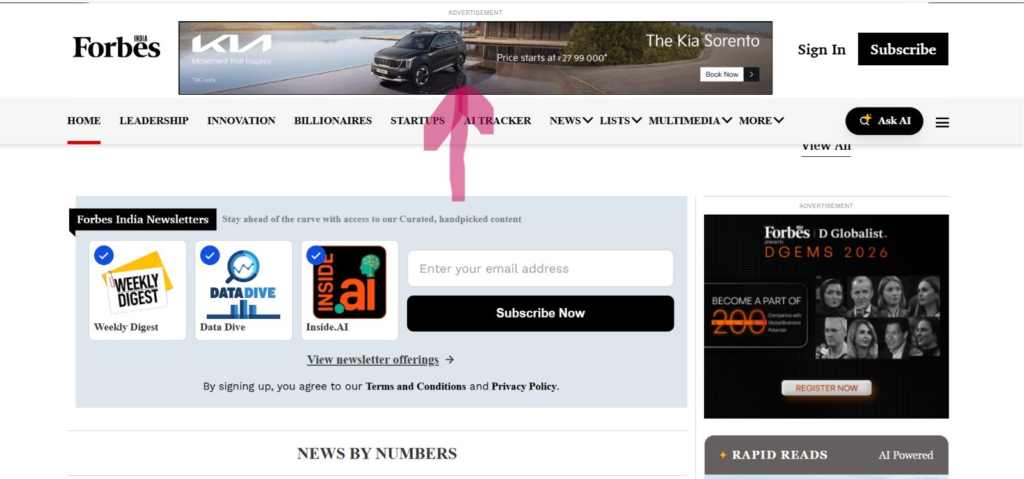
Display Ads Example Image
What Are YouTube Ads?
YouTube Ads are video and other advertising formats managed through Google Ads. They help businesses reach relevant audiences while people watch videos, browse content, or discover videos on YouTube.YouTube offers different ad formats to help businesses promote their products and services, increase brand awareness, generate interest, and encourage customer actions.

YouTube Ads Example
Skippable In-stream Ads
Skippable in-stream ads appear before, during, or after eligible YouTube videos. Viewers can usually skip these ads after the first five seconds.
Businesses use this format to introduce their products or services, explain their benefits, and encourage viewers to visit their website or take another action.
Non-skippable In-stream Ads
Non-skippable in-stream ads are video advertisements that viewers cannot skip. They can appear before, during, or after eligible YouTube videos.
These ads are useful when businesses want viewers to receive a complete advertising message. The maximum duration depends on the eligible format and placement.
Bumper Ads
Bumper ads are short, non-skippable video advertisements of up to six seconds.
They are designed to communicate a simple, memorable message and help businesses build brand awareness.
In-feed Video Ads
In-feed video ads appear in eligible YouTube discovery placements, such as search results, the Home feed, and related browsing experiences.
They generally feature a thumbnail, headline, and supporting text. Viewers can choose to click the ad to watch the promoted video.
YouTube Shorts Ads
YouTube Shorts ads appear between eligible videos in the Shorts feed.
Businesses can use vertical video creatives to introduce products, promote services, and reach audiences who consume short-form video content.
YouTube Masthead Ads
YouTube Masthead ads appear prominently at the top of the YouTube Home feed on eligible devices.
They are designed to provide substantial visibility for major campaigns and product launches. This is a premium advertising placement, and availability depends on Google’s current buying options.
Companion Banners
Companion banners are visual ads that may appear alongside eligible YouTube video advertisements on supported desktop placements.
They provide additional brand visibility and may help interested viewers explore an advertiser’s offer.
Note: Older desktop overlay formats should not be presented as a standard current YouTube Ads option without verifying their present availability.
How Does Google Ads Management Work?
Google Ads management involves several important steps.
1. Account Setup
The first step is to create or access a Google Ads account using a Google Account. Advertisers then configure relevant account settings, billing information, and business details.
2. Keyword Research
Keyword research helps advertisers identify the search terms potential customers use when looking for products or services.
Google Keyword Planner provides keyword ideas and estimates that can help advertisers plan their campaigns.
For example, a coaching institute might research keywords such as:
- Class 10 coaching in Muzaffarpur
- Best coaching institute near me
- Mathematics tuition classes
Advertisers should select keywords according to their services, target audience, and campaign objectives.
3. Campaign Setup
Campaign setup involves choosing the campaign type, budget, bidding strategy, location targeting, language settings, and advertising goals.
For example, a school might create a campaign called “School Admission Campaign 2027” to generate admission inquiries.
Campaign: Defines the overall campaign settings, such as budget and targeting.
Ad Group: Organizes related keywords and ads within a Search campaign.
Ads: Include the advertising messages, such as headlines and descriptions, shown to potential customers.
The exact structure and settings depend on the campaign type.
4. Ad Copy Creation
Ad copy includes the headlines and descriptions used in advertisements.
The content should be relevant to the business, targeted keywords, and users’ search intent.
For example:
Headline: Admissions Open for 2027
Description: Explore our school programs and contact us today to learn more about admissions.
Advertising claims should always be accurate and reflect the actual offer.
5. Budget and Bidding Management
Budget management involves setting and monitoring the amount allocated to advertising.
Bidding determines how Google Ads bids in the advertising auction. Depending on the campaign objective, advertisers may use strategies designed to generate clicks, conversions, or other outcomes.
For example, an advertiser might start with a daily budget of ₹500 and evaluate performance before making adjustments.
Actual spending and results depend on campaign settings and auction conditions.
6. Negative Keyword Management
Negative keywords help prevent ads from appearing for irrelevant searches.
For example, a paid coaching institute might consider excluding terms such as:
- Free
- Jobs
- Careers
- Salary
- Internship
However, negative keywords should be selected after reviewing search intent and actual search-term data. A term such as “free” should only be excluded if it is irrelevant to the advertiser’s offer.
7. Campaign Optimization
Campaign optimization involves reviewing performance data and making informed adjustments.
Common optimization activities include:
- Reviewing search terms.
- Adding relevant negative keywords.
- Improving ad copy.
- Adjusting bids and budgets when appropriate.
- Reviewing location and audience targeting.
- Checking landing pages and conversion tracking.
Optimization frequency depends on campaign performance, budget, and the amount of available data. Changes should be based on evidence rather than made simply to keep the account active.
8. Performance Reporting
Reporting helps advertisers understand how their campaigns are performing.
Important metrics include:
- Impressions: How often ads were shown.
- Clicks: How many times users clicked ads.
- CTR: The percentage of impressions that resulted in clicks.
- Average CPC: The average cost per click.
- Conversions: The number of tracked valuable actions.
- Conversion Rate: The percentage of measured interactions that resulted in conversions.
These metrics help businesses evaluate campaign performance and identify opportunities for improvement.
Who Can Benefit from Google Ads
Today, many people use Google to research products and services before making a purchase decision. They search for information, compare available options, read reviews, and explore businesses that match their needs.
This is where Google Ads can help businesses connect with potential customers. By displaying relevant advertisements to people searching for related products or services, businesses can increase their online visibility, generate inquiries, and support business growth.
Google Ads also offers location targeting, budget control, and performance measurement. Businesses can monitor metrics such as clicks, calls, leads, form submissions, and conversion costs when the appropriate tracking is configured.
Let’s understand how Google Ads can benefit different types of businesses.
Google Ads for Schools
Schools can use Google Ads to reach parents searching for schools during the admission season.
For example:
- Best school near me
- CBSE school in Bhagalpur
- School admissions open 2027
How Google Ads helps schools:
- Reach parents searching for relevant school options.
- Generate admission inquiries and school visit bookings.
- Target selected locations around the school.
- Promote admission campaigns during relevant periods.
- Measure calls, inquiry forms, and other tracked conversions.
Example: A school in Bhagalpur can target relevant searches from families in its service area and direct interested parents to its admission page.
Google Ads for Coaching Institutes
Coaching institutes can use Google Search Ads to reach students and parents searching for specific courses.
For example:
- NEET coaching in Bhagalpur
- Class 10 tuition near me
- SSC preparation classes
How Google Ads helps coaching institutes:
- Promote specific courses and batches.
- Generate inquiries for demo classes.
- Reach relevant audiences in selected locations.
- Create separate ad groups for different courses.
- Measure inquiry forms, calls, and admission-related conversions.
Example: A coaching institute can create separate campaigns or ad groups for NEET preparation and Class 10 tuition, depending on its campaign structure and budget.
Google Ads for Hospitals and Clinics
Hospitals and clinics can use Google Ads to reach people searching for relevant medical services.
For example:
- Eye hospital in Bhagalpur
- Child specialist near me
- Dental clinic in Bhagalpur
How Google Ads helps healthcare businesses:
- Increase visibility for relevant medical services.
- Encourage appointment inquiries and calls.
- Direct users to service pages and contact information.
- Reach people searching within selected service areas.
- Measure eligible calls and appointment inquiries when tracking is configured.
Important: Healthcare advertising must follow Google’s healthcare and personalized advertising policies. Advertisers should avoid misleading medical claims and must comply with applicable restrictions.
Google Ads for Real Estate
Real estate businesses can use Google Ads to reach people searching for properties, flats, plots, or commercial spaces.
For example:
- 2 BHK flat in Patna
- Residential plots for sale in Bhagalpur
- Flats under ₹30 lakh
How Google Ads helps real estate businesses:
- Promote individual projects and property listings.
- Generate inquiries through calls and website forms.
- Target relevant locations based on campaign settings.
- Direct potential buyers to property details and project pages.
- Measure inquiries and qualified leads.
Example: A real estate business can create separate campaigns for residential flats and plots to understand which property category generates more relevant inquiries.
Why Choose DigitalUdaan?

Market Understanding
Every business has different customers, goals, and challenges. At DigitalUdaan, we focus on understanding your business, target audience, local market, and competition before planning your Google Ads campaigns. This helps us identify relevant keywords and create advertising strategies aligned with your business objectives.

Transparent Reporting
We believe in clear communication and transparent campaign reporting. We help you understand how your advertising budget is being spent and track important performance metrics such as impressions, clicks, cost per click (CPC), leads, and conversions, wherever tracking is available. Our goal is to provide clear insights that support informed marketing decisions.

Campaign Management Approach
Our campaign management approach focuses on planning, execution, monitoring, and continuous improvement. From keyword research and campaign setup to budget monitoring and performance analysis, we work to keep your Google Ads campaigns aligned with your business goals. We use campaign data to identify improvement opportunities and make informed optimization decisions.